
I just can’t get enough of AI and the next phase for me is to create videos and more music. I was using Suno for music creation but I think I found something better. It may be more or less expensive depending on how much you use Suno to create music. Suno now has a 20 download limit per month on their cheapest $8/month plan and it doesn’t create video or images or other editing capabilities.
I watched this YouTube video from Mark Gadala-Maria and it got me curious so I created my own install on RunPod.
The install was a bit more technical than I would have liked but I did get it working. The hard part was getting the encryption key. There is a command you have to type in the console and I got the key but I couldn’t copy it using Copy/Paste (Cntrl+C / Cntrl+V) so I had to manually write it down and type it in.
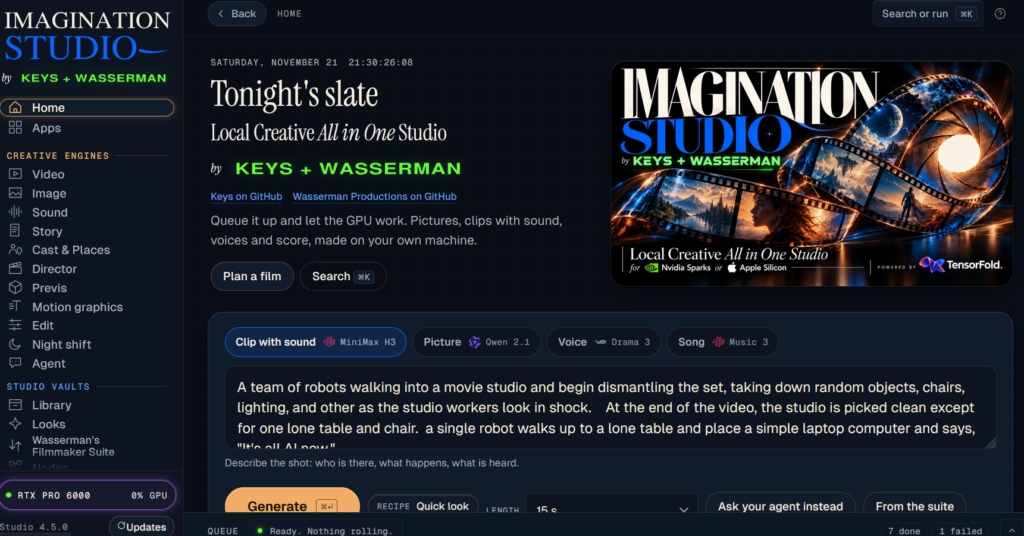
This is a screen shot from my Imagination Studio running in the cloud off of RunPod.io (note this link has a referral code for me to earn credits on Runpod.io).
The Studio has a menu to create video, sound/music and images. It does have a learning curve but it is fairly easy to use. I bought $150 in credits and the way this works is you are essentially renting a high powered GPU that’s dedicated for your use for as long as you have credits. For the recommended setup for the I.Studio I rented 1 × RTX PRO 6000 Blackwell · 96 GB VRAM and 1TB of storage. The cost is $2.69/hour.
What can you create at $2.69/hour?
The answer to that depends on how prepared you are to fill in the prompt screens for each area (video, music, images). Since I had no experience with this tool I was a bit slow figuring things out. I created two video clips about 15 seconds each, I created two songs about 4 minutes long, and various images. All of that cost about $3 since I went over an hour while I was using the RunPod. The quality of the first video was total crap but I realized there were “templates” you could use to create higher quality images so my second video was way better.
The music quality of the songs I produced was really good. I plan on logging back on and creating some more music and I will figure out how many songs I can create in an hour. The key is to have the lyrics, song parameters (music type, bpm, etc) available in a document so you can just copy and paste. There is a way to integrate chatbots and AI agents but I haven’t figured that out yet.
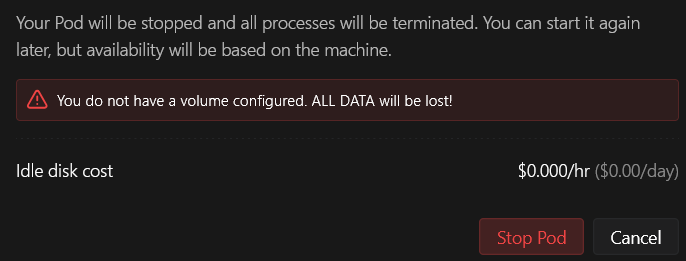
The big GOTCHA here is that you don’t have permanent storage (that costs extra) and if you leave the RunPod running it will eat $2.69 every hour so if you go to bed without completely shutting it down and deleting the Pod it will burn through your money. You have to download all your stuff, stop the pod and delete it for good measure.
I expect the tech to get cheaper and better as time goes on and in my dream world, the cost of GPUs, RAM, and related hardware comes down over the next few years so that I can run this whole thing at home. Technically, it is possible to run Imagination Studio at home but only if you have a high end computer with the GPU and memory on it.
I canceled my Suno subscription and will try this tool for the next few weeks but I like it a lot because it’s showing me how a high powered GPU can make my digital media life so much easier. I just need the hardware to get cheaper and then I will have no use for RunPod once I have my own hardware. Imagination Studio is open source by the way so it’s free. And if it weren’t free someone somewhere would eventually use AI to clone it.
Update: I spent Sunday creating music exclusively with Imagination Studio running on RunPod. It takes about 6 to 8 minutes to create a 4 minute song so the answer to the question of how many you can create in an hour is 7.5 to 10. I had Codex doing all the work in an automated fashion, it wasn’t me typing or cutting/pasting lyrics text and style text into the prompts in Imagination Studio, it was AI doing all the automation. For $3/hr and creating 8 songs that you can download isn’t too bad considering there is no limit whereas Suno limits you to 20 downloads per month now on their $8/plan. Imagination Studio also doesn’t have any restrictions on the content you can create so that is another factor as well.
The best part for me however was using Codex to do a ton of pre-work before I even started the RunPod since the ‘meter was running’ so to speak. I am desperate to have my own hardware but I can see where this is a very good alternative for now until they go bankrupt when everyone at home builds their own AI setup. I will continue to use it.
Share The Wealth
Are you creating your own videos with your own cloud rented GPU yet?